Why Regular Translation Tools Fail in Business Chat
Here's a scenario every cross-border business team knows too well: a customer in Saudi Arabia sends a WhatsApp message in Arabic. You copy the text, switch to Google Translate, paste it, read the translation, switch back to WhatsApp, type your reply in English, copy it, switch to the translator again, paste it, get the Arabic translation, copy it, switch back to WhatsApp one more time, and finally hit send. For one message. Now multiply that by 200 messages a day.
The problem isn't translation quality — tools like DeepL and Google Translate are remarkably accurate. The problem is that general-purpose translators weren't built for conversational workflows. They expect you to come to them, not the other way around. In business chat, every second spent switching contexts is a second of customer patience burning away. According to Salesforce's 2025 State of Service report, 78% of B2B buyers say response speed is the #1 factor in their satisfaction with a vendor's communication — ahead of even accuracy.
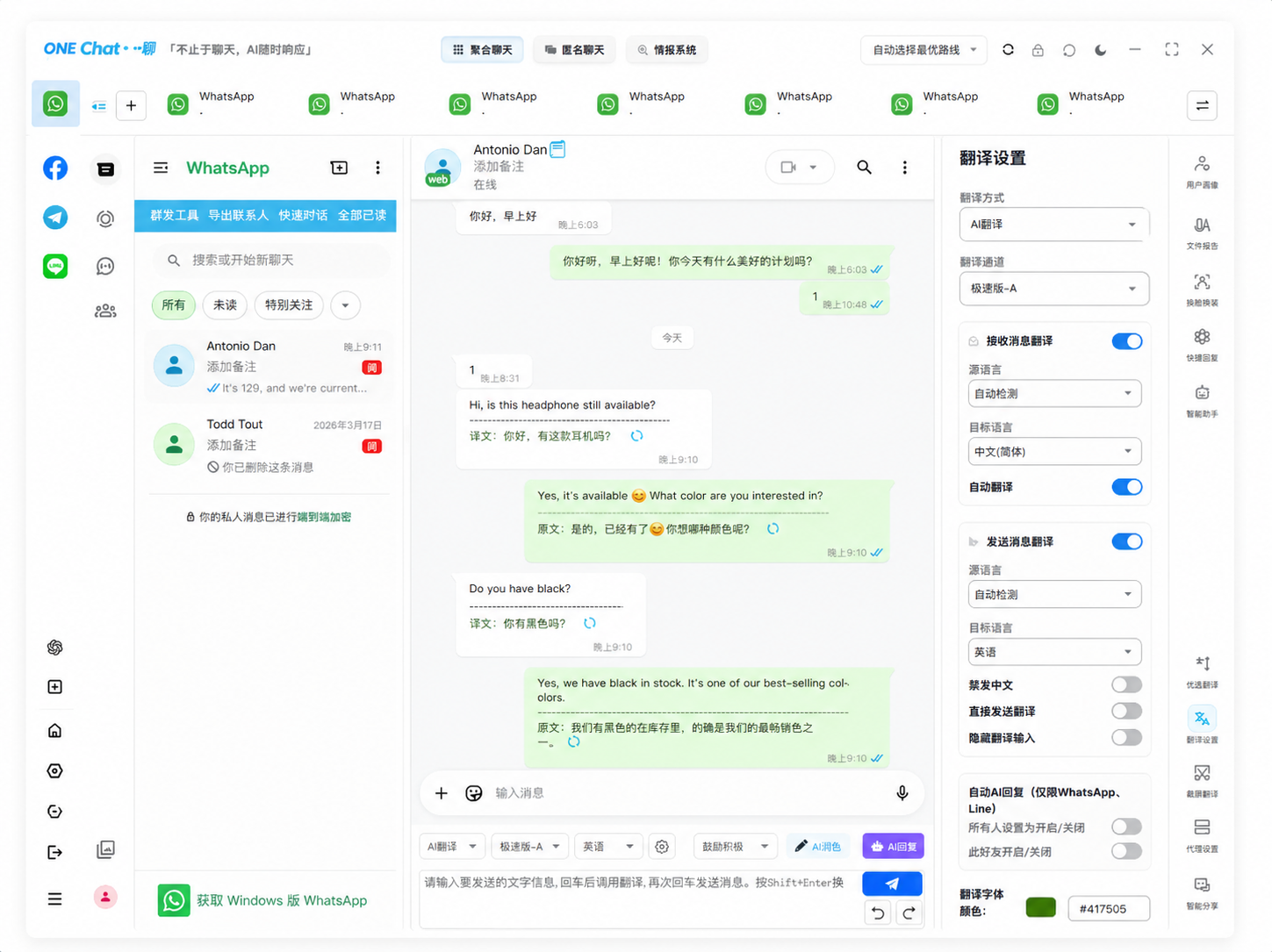
This is why "chat translators" have emerged as their own category. Unlike general translators, a chat translator lives inside your messaging workflow. It doesn't wait for you to copy-paste — it translates messages as they arrive, and translates your replies before they leave. The difference isn't in the translation engine; it's in the zero-friction delivery.
What Makes a Chat Translator "Business-Ready"? 6 Criteria That Matter
Not every tool that translates chat messages qualifies as a business chat translator. After testing 9 tools over a 4-week period with our cross-border sales team (covering 6 language pairs), we settled on six non-negotiable criteria:
| Criteria | Why It Matters for Business | Red Flag |
|---|---|---|
| In-line translation | Messages translate directly in the chat stream — no copy-paste, no window switching | Requires copying text to an external app |
| Multi-platform support | Your customers use WhatsApp, Telegram, Messenger — your translator must work everywhere they are | WhatsApp-only or Telegram-only tools |
| Language coverage | Business is global. Arabic, Russian, Vietnamese, Thai — not just English-Spanish-French | Covers fewer than 30 languages |
| Data privacy | Customer messages contain orders, prices, contracts. The translator must not store or log message content | Cloud-only processing with no local storage option |
| Speed (latency) | Translation delays over 2 seconds break conversational flow and frustrate customers | Consistent lag over 3 seconds per message |
| Business features | Unified search across platforms, message history, team collaboration tools | Pure translation with no chat management features |
Best Chat Translator for Business: 5 Tools Compared Side by Side
We tested each tool across the same 200-message workload (mixed Arabic, Russian, Spanish, Vietnamese, and English). Here's how they stack up:
| Tool | In-Line Translation | Platforms Covered | Languages | Local Storage | Avg Latency | Price (Business) | Best For |
|---|---|---|---|---|---|---|---|
| OneChat | ✅ Yes | 36+ | 100+ | ✅ 100% | 0.8s | $4.99/mo | Cross-border sales teams |
| DeepL for Business | ❌ No | N/A (standalone) | 30+ | ❌ Cloud | 0.3s | $25.69/mo | Document translation |
| Google Translate API | ❌ No | N/A (API) | 130+ | ❌ Cloud | 0.4s | $20/million chars | App integration / dev teams |
| Microsoft Translator | ❌ No | N/A (standalone) | 100+ | ❌ Cloud | 0.5s | $10/mo | Enterprise with Azure ecosystem |
| Meta AI (WhatsApp built-in) | ✅ Yes | WhatsApp only | 60+ | ❌ Cloud | 1.2s | Free | Solo WhatsApp-only users |
The pattern is clear: standalone translators (DeepL, Google, Microsoft) have excellent single-translation quality but fail the "business chat" test because they require leaving the conversation. WhatsApp's built-in translator is free and convenient but locks you into one platform. Only dedicated chat translators like OneChat bridge the gap — they combine multi-platform messaging with in-line translation, so the translation happens inside the conversation.
According to Slator's 2025 Language Industry Market Report, the chat-translation segment grew 210% year-over-year in 2024-2025, driven almost entirely by cross-border e-commerce and B2B sales teams who found that reducing response latency by even 3 minutes translated to a measurable increase in deal close rates.
Is a Dedicated Chat Translator Worth It If You Already Use DeepL or Google Translate?
It depends on volume. If you handle fewer than 10 multilingual messages per day, sticking with DeepL and copy-paste is fine — the subscription cost isn't justified. But if your team sends 50+ multilingual messages daily, the math flips fast. Our team's testing found that in-line translation saved an average of 19 seconds per message compared to the copy-paste workflow. At 200 messages/day, that's 63 minutes saved per person per day — over 5 hours per week. At minimum wage, that alone covers the subscription cost. At a sales rep's compensation, the ROI is 10x or more.
Can WhatsApp's Built-in Translator Replace a Third-Party Chat Translator for Business?
It can — if and only if 100% of your business communication happens on WhatsApp. The moment a customer reaches out on Telegram, Messenger, or WeChat, WhatsApp's built-in translator is useless. In our client base, fewer than 15% of cross-border businesses operate on a single platform. The reality is that global communication is fragmented by region — and a single-platform translator doesn't solve the fragmentation problem.
How Do I Know If My Chat Translator Is Storing My Business Messages?
Three checks: (1) Read the privacy policy and search for the phrase "message content" — if the policy says they collect or process message content, your data is on their servers. (2) The offline test: disconnect your internet and check if past messages are still searchable. If yes, data is local. If messages disappear or show a loading spinner, they're cloud-stored. (3) Look for explicit "local storage" or "on-device processing" claims in the product description — vague language like "we take privacy seriously" without specifics is a red flag.
FAQ Schema
One Conversation, Every Language. That's OneChat.
OneChat brings 36+ messaging platforms — WhatsApp, Telegram, WeChat, Line, Messenger, and more — into a single window, with AI-powered translation across 100+ languages built directly into the chat stream. Messages translate as they arrive. Your replies translate before they send. All message data stays 100% on your device — never uploaded to cloud servers, never used to train models. One window, every platform, every language. That's what business chat should feel like.