Why You Need a WhatsApp Translator for PC
If you're running an international business from your computer, you've probably caught yourself doing this: type a reply in WhatsApp Web, copy it, paste it into Google Translate, switch languages, copy the translation, paste it back into WhatsApp, hit send. Repeat 50 times a day.
A proper WhatsApp translator for PC eliminates every one of those steps. It translates messages automatically — incoming and outgoing — so you stay in one app, one window, one flow. For businesses handling customers across 5+ countries, this isn't a luxury — it's the difference between responding in 30 seconds vs. 5 minutes.
According to a Harvard Business Review study on response times, contacting a lead within 5 minutes makes you 100x more likely to convert than waiting 30 minutes. Every second spent copy-pasting translations is costing you deals.
The 5 Best WhatsApp Translators for PC in 2026
We tested the most popular options based on translation quality, speed, platform support, privacy, and price. Here's how they stack up:
1. OneChat — Best Overall
- Translation: AI-powered, 100+ languages, real-time auto-translate
- Platforms: 36+ (WhatsApp, Telegram, Line, Zalo, Messenger, and more)
- Privacy: 100% local storage — messages never touch a cloud server
- Extra features: AI voice cloning, AI face swap, AI auto-reply, voice message translation
- Price: Completely free
- Best for: Businesses managing multiple chat platforms who want an all-in-one solution
2. Haiwang Translator — Best WhatsApp Specialist
- Translation: Real-time, major languages covered
- Platforms: 5+ (WhatsApp, Telegram, Messenger)
- Privacy: Cloud-based translation
- Price: Freemium (free tier with usage limits)
- Best for: WhatsApp-heavy sellers who don't need multi-platform support
3. Wukuang Translator — Best Budget Option
- Translation: Text translation, basic accuracy
- Platforms: Translation tool only (no chat integration)
- Privacy: Cloud-based
- Price: Free (ad-supported)
- Best for: Occasional translation needs where chat integration isn't required
4. 007 Translator — Most Established
- Translation: Multi-language, document + web translation
- Platforms: Translation tool only (no chat integration)
- Privacy: Cloud-based
- Price: Freemium (~$5/month for premium)
- Best for: Users who need document translation alongside chat translation
5. Google Translate (Manual) — The Free Baseline
- Translation: 130+ languages, good accuracy
- Platforms: Standalone — requires copy-paste
- Privacy: Cloud-based
- Price: Free
- Best for: Nothing — if you're reading this guide, you've outgrown it
Head-to-Head Comparison Table
| Feature | OneChat | Haiwang | Wukuang | 007 | |
|---|---|---|---|---|---|
| Auto-translate | ✅ Real-time | ✅ Real-time | ❌ Manual | ❌ Manual | ❌ Manual |
| Chat integration | ✅ Full | ✅ Partial | ❌ | ❌ | ❌ |
| Platforms covered | 36+ | 5+ | N/A | N/A | N/A |
| Voice message translation | ✅ | ✅ | ❌ | ❌ | ❌ |
| Local data storage | ✅ 100% | ❌ | ❌ | ❌ | ❌ |
| AI voice cloning | ✅ | ❌ | ❌ | ❌ | ❌ |
| AI face swap | ✅ | ❌ | ❌ | ❌ | ❌ |
| Price | Free | Freemium | Free (ads) | $5/mo | Free |
How to Choose the Right WhatsApp Translator for Your Business
Ask yourself these three questions:
- How many platforms do you actually use? If it's just WhatsApp, Haiwang might be enough. If you're on WhatsApp + Telegram + Line + Zalo (common for Southeast Asian markets), you need OneChat's multi-platform approach.
- How sensitive is your chat data? If you discuss pricing, contracts, or trade secrets over chat, cloud-based tools put that data on someone else's server. OneChat's local-only processing is the only option that guarantees your data stays yours.
- Do you need more than just translation? AI voice cloning for phone calls, AI face swap for video meetings, AI auto-reply for after-hours — these features go beyond translation and directly impact your conversion rates. Only OneChat offers the full AI toolkit in one app.
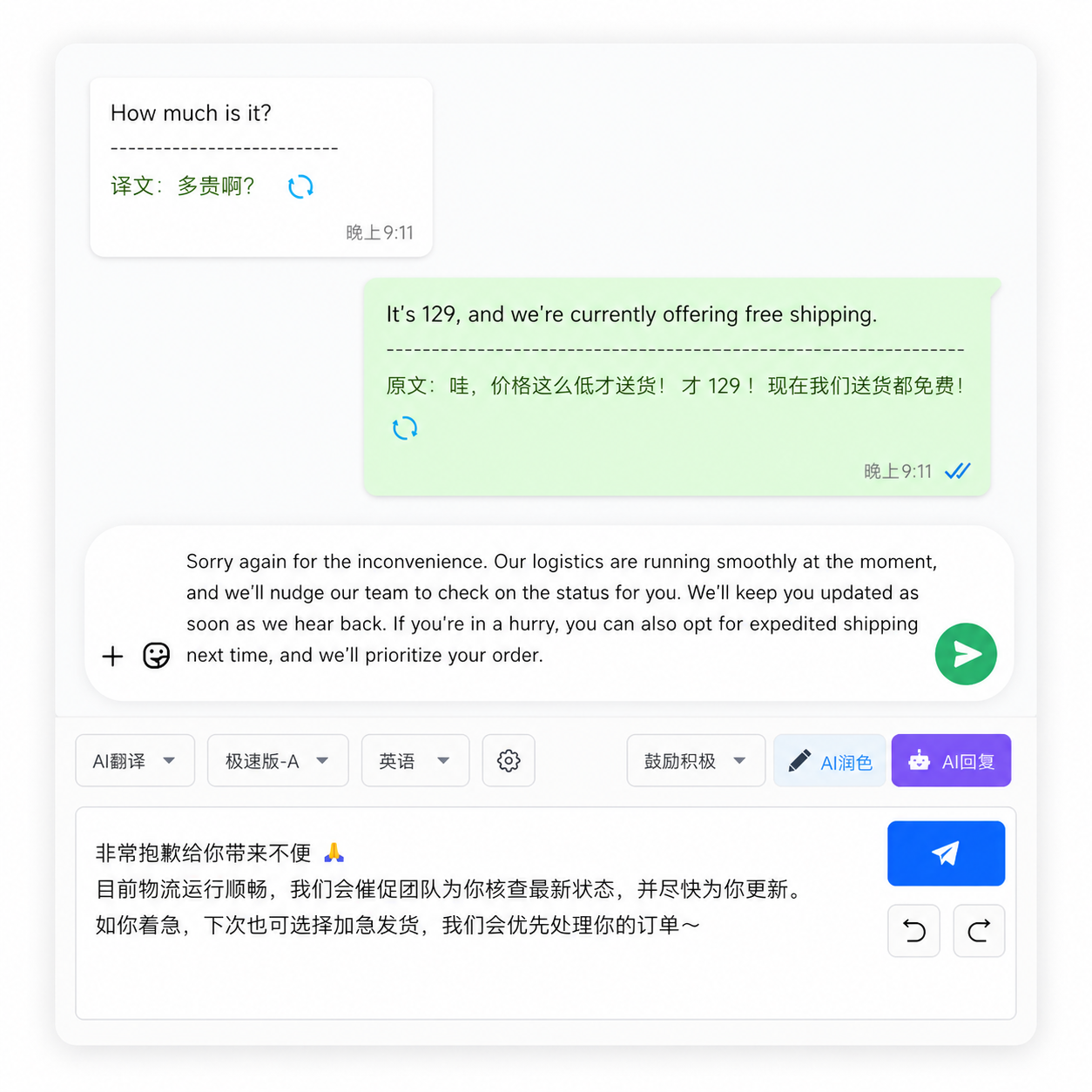
Setup Guide: Install a WhatsApp Translator for PC in 3 Minutes
- Download OneChat from onechat.chat/download — available for Windows and macOS.
- Scan the WhatsApp QR code — same process as WhatsApp Web. Your messages sync instantly.
- Turn on auto-translate — Settings > Translation > pick your languages > enable Auto-Translate. Done.
From that point forward, every message you receive is translated. Every message you send is translated before delivery. You never copy-paste again.
FAQ
Get the Best WhatsApp Translator for PC — Free
OneChat — 36+ platforms in one window. AI real-time translation for 100+ languages. Voice cloning. Face swap. Auto-reply. 100% local. 100% free.